Share
SSD Buying Guide-How to Choose a PC Drive: 2.5 SATA vs. M.2 NVMe Specs and Compatibility Differences
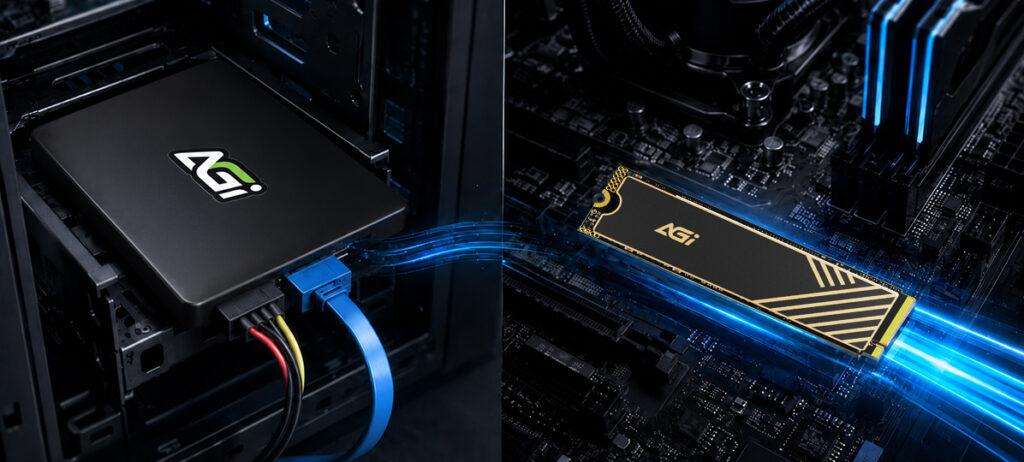
When upgrading your PC or replacing a storage device, you will commonly encounter two types of SSDs: 2.5-inch SATA SSDs and M.2 NVMe SSDs.
Most users immediately face three fundamental questions:
- What are the key differences between them?
- Which type delivers faster performance?
- Which SSD is compatible with my system architecture?
Each form factor offers distinct operational advantages. The primary consideration when selecting a drive is aligning your specific performance requirements with your system’s hardware compatibility. This guide outlines three critical factors to help you quickly understand the structural and performance differences between them.
I. Form Factor and Installation: Legacy Drive Upgrades vs. Next-Gen Design
The most apparent distinctions lie in physical dimensions and deployment methods.
Note: The vast majority of modern laptop designs and desktop motherboards natively feature integrated M.2 NVMe slots.
2.5-inch SATA SSD The 2.5-inch SATA form factor mirrors traditional HDDs, making it ideal for retrofitting legacy desktops and laptops. It interfaces with the motherboard via a standard SATA data connector and power cable, utilizing identical mounting processes as legacy drives.
- Advantages:
- High backward compatibilitySimplified installationExtensive support across older system architectures
Note: For systems currently relying on traditional HDDs, a direct drop-in replacement with a 2.5-inch SATA SSD delivers an immediate performance upgrade.
M.2 NVMe SSD The M.2 NVMe SSD utilizes an ultra-compact, low-profile printed circuit board (PCB) design. It mounts directly into the motherboard’s dedicated M.2 slot, completely eliminating the need for external data and power cabling.
- Advantages:
- Minimal footprint
- Cable-free installation
- Support for high-bandwidth data transmission
Note: The vast majority of modern laptop designs and desktop motherboards natively feature integrated M.2 NVMe slots.
II. Throughput Discrepancies: Why NVMe Outperforms SATA
Data transfer speed represents one of the most critical performance differentiators between the two architectures.
- 2.5-inch SATA SSD: Utilizes the legacy SATA interface. Because this standard was natively engineered for mechanical hard drives (HDDs), its maximum throughput remains inherently throttled.
- M.2 NVMe SSD: Interfaces directly with the CPU via high-speed PCI Express (PCIe) lanes, eliminating traditional data bottlenecks to deliver exponentially higher operational speeds.
Below is a standard performance comparison between the two common SSD interfaces:
| SSD Type | Interface | Read Speed |
| 2.5-inch SATA SSD | SATA III | Approx. 500 MB/s |
| M.2 NVMe SSD (PCIe Gen3) | PCIe | Approx. 3,000 MB/s |
| M.2 NVMe SSD (PCIe Gen4) | PCIe | Approx. 7,000 MB/s |
In short, NVMe SSD throughput can achieve speeds 5 to 10+ times faster than standard SATA SSDs. This performance variance is most pronounced during data-intensive operations, such as:
- Large-scale game asset deployment and loading
- High-resolution video post-production and editing
- Massive sequential file transfers
- Enterprise creative software workflows
Consequently, if the deployment system features native NVMe support, it represents the superior hardware choice.
III. Selection Strategy: Assessing Hardware Compatibility and Workloads
The optimal choice depends directly on evaluating your system’s hardware specifications alongside your specific workload demands.
| Use Case | Recommended SSD Type | Technical Rationale |
| Legacy System Upgrades | 2.5-inch SATA SSD | High backward compatibility and simplified installation. |
| General Productivity / Web Browsing | SATA or NVMe SSD | Both architectures deliver a significant, perceptible lift in day-to-day responsiveness. |
| Gaming / Multimedia | M.2 NVMe SSD | Maximizes data throughput to reduce asset loading times. |
| Video Production / Enterprise Workloads | High-Speed NVMe SSD | Accelerates file read/write metrics and overall workflow efficiency. |
If you are on a tight budget, a SATA SSD can already deliver a very noticeable boost in performance.
For digital creators or gamers with a flexible budget, a PCIe SSD is definitely the top choice. Delivering read and write speeds of over 5000 MB/s, it drastically cuts down loading times and rendering workflows. Whether you are working on 4K/8K high-definition video post-production, handling raw footage, or a gamer who loves AAA titles, it will significantly elevate your overall creative efficiency and gaming experience.
Conclusion: Maximize System Performance with the Right SSD Configuration
Upgrading to either a 2.5-inch SATA SSD or an M.2 NVMe SSD will yield a substantial and immediate enhancement in system performance.
- SATA SSDs provide a highly reliable, stable deployment path with maximum backward compatibility.
- NVMe SSDs deliver uncompromised high-speed data throughput for an ultra-fluid user experience.
For deployment of dependable storage upgrades, the AGI SSD product portfolio serves as an optimal solution. AGI offers a comprehensive selection of SATA and NVMe form factors across various capacity configurations, tailored to support general productivity, gaming, and enterprise creative workloads.
Engineered with stable performance architectures, rigorous quality assurance testing, and cost-effective design principles, AGI SSDs eliminate system latency and elevate overall operational efficiency. Upgrade your storage infrastructure today to eliminate performance bottlenecks and restore peak operational speed.
*Note: If the targeted desktop motherboard or laptop deployment framework features native M.2 NVMe slots, selecting an NVMe SSD will yield superior performance metrics. However, for legacy hardware optimization, a SATA SSD remains an exceptionally reliable and cost-effective upgrade vector.